> ## Documentation Index
> Fetch the complete documentation index at: https://graphite-58cc94ce.mintlify.site/docs/llms.txt
> Use this file to discover all available pages before exploring further.
# Configure The CLI
> Learn how to configure the Graphite CLI to customize and speed up your workflow.
## Configuration options
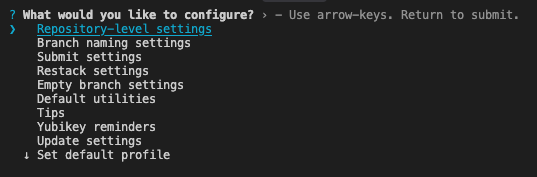
Run `gt config` to open an interactive menu which lets you configure your Graphite CLI. The options are described in more detail below.
 ### User-level configuration
#### Branch naming settings
If you don't specify a name for your branch when using [`gt create`](/command-reference#create-name), then Graphite will generate one for you based on the commit message.
There are several options to configure:
1. A custom prefix (for example, initials).
2. Whether or not the date is prepended to the branch.
3. Whether to allow certain characters like slashes and uppercase letters
4. The character to replace unsupported symbols (for example, whitespace and anything other than alphanumeric characters, periods, dashes, underscores, and slashes.)
#### Submit settings
**Set PR metadata in CLI**
Graphite lets you prepare your PR for review in the web UI by default. This allows you to preview markdown, pull options like reviewers and labels from downstack PR's, and update all PR's in a stack at once.
Enable this setting to instead default to writing PR description in the CLI.
**PR description**
Graphite includes your GitHub PR template in the commit message by default.
Graphite can include the commit messages of your branch in the body of your PR automatically on submit. If you enable this, you can choose whether or not to also include your PR template.
If you only have a single commit on your branch, the first line of the message (its title) will not be included as this is already the default for the name of the PR.
#### Rebase behavior
The `git rebase` flag `--committer-date-is-author-date` is useful if you don't want your Graphite restack operations to update the committer date of the commits in your branches. In order to have Graphite's internal rebases use this flag, you can enable this configuration.
#### Sync settings
Toggle to automatically delete merged or closed branches during `gt sync` and `gt get` operations.
#### Empty branch settings
Specify how Graphite should handle empty branches after an operation (keep or delete).
##### Default utilities
By default, Graphite uses the `git` editor for drafting PR descriptions and other flows that require editing text. You can configure a different editor.
By default, Graphite opens PR descriptions and other flows that require editing text in the `git` pager. You can configure a different pager, or disable paging entirely.
Note that just like git, Graphite sets the environment variables `LESS=FRX` and `LV=-c` if they are not already set. If something else is setting your `LESS` env var, you can use `gt user pager --set "less -FRX"` to get the recommended pager settings.
You can also set the editor or pager on a per-command basis with the `GT_EDITOR` and `GT_PAGER` environment variables, respectively.
#### Tips
Toggle on and off inline tips in the Graphite CLI.
#### Yubikey
If you use a Yubikey to protect your GitHub SSH key, you may be used to Git commands reminding you to touch it. Graphite is not able to print this output directly to the CLI due to how Git calls SSH, so you can enable this configuration to be reminded when Graphite is about to run a command that requires you to touch your Yubikey.
#### Update settings
You can individually enable or disable automatic updates and update prompts.
As of [version 1.7.4](/cli-changelog#1-7-4), `gt` is able to automatically update in the background. These automatic updates are disabled by default for existing `gt` installs that get updated to `1.7.4` or higher. They are enabled by default for new `gt` installs.
The configuration for automatic updates and update prompts gets set in the `~/.config/graphite/user_config` file:
```json theme={null}
"updateAutomatically": true,
"promptForUpdates": true,
```
#### Custom configuration paths
User configuration gets stored in the `user_config` file in the `~/.config/graphite/` directory. This user configuration applies globally when executing `gt` commands.
To apply a different user configuration locally, such as if you work with clones of the same repo and want different branch name settings for each, you can create a `user_config` file in another directory and set the [`$XDG_CONFIG_HOME` environment variable](https://specifications.freedesktop.org/basedir-spec/basedir-spec-latest.html) to that directory's path.
### Repository-level configuration
Repository-level configuration is stored in the `.git` folder of your repository.
#### Trunk branches
Configure one or more trunk branches. For developing on multiple trunk branches see our tutorial [here](/multiple-trunks).
#### Git remote name
Graphite defaults to pushing to and pulling from `origin`.If you have configured a different name for your remote, you can set it manually.
#### GitHub repository information
Once the remote URL is set, Graphite infers the GitHub repository name and owner from the remote URL, but in cases where they are not inferred correctly, you can override them.
## Overriding auth tokens with an environment variable
The `GRAPHITE_AUTH_TOKEN` environment variable is supported from `gt` version `1.8.3` onwards
You can set the `GRAPHITE_AUTH_TOKEN` environment variable to override authentication tokens from config files and profiles. This is useful for CI/CD pipelines, containerized environments, or any context where you don't want to rely on a config file.
```shell theme={null}
GRAPHITE_AUTH_TOKEN=your-token gt sync
```
The environment variable takes precedence over both the config file token and any profile-specific token.
## Using Graphite CLI with multiple GitHub user accounts/auth tokens
Multiple profiles are supported from `gt` version `1.7.2` onwards
In your `~/.config/graphite/user_config` file you can set alternative named profiles so that each can make use of separate auth tokens:
```shell theme={null}
{
"alternativeProfiles": [
{
"name": "work_github_account",
"authToken": "xxxx"
},
{
"name": "personal_github_account",
"authToken": "xxxx"
}
]
}
```
### From `gt` versions `1.7.2` - `1.7.8`:
You can set the `GRAPHITE_PROFILE` environment variable with the name of the profile you want to run `gt` commands with:
```shell theme={null}
GRAPHITE_PROFILE=work_github_account gt sync
```
### From `gt` version `1.7.9` onwards:
Set your profile by running `gt config` -> `Set default profile` to see a list of your alternative profiles:
### User-level configuration
#### Branch naming settings
If you don't specify a name for your branch when using [`gt create`](/command-reference#create-name), then Graphite will generate one for you based on the commit message.
There are several options to configure:
1. A custom prefix (for example, initials).
2. Whether or not the date is prepended to the branch.
3. Whether to allow certain characters like slashes and uppercase letters
4. The character to replace unsupported symbols (for example, whitespace and anything other than alphanumeric characters, periods, dashes, underscores, and slashes.)
#### Submit settings
**Set PR metadata in CLI**
Graphite lets you prepare your PR for review in the web UI by default. This allows you to preview markdown, pull options like reviewers and labels from downstack PR's, and update all PR's in a stack at once.
Enable this setting to instead default to writing PR description in the CLI.
**PR description**
Graphite includes your GitHub PR template in the commit message by default.
Graphite can include the commit messages of your branch in the body of your PR automatically on submit. If you enable this, you can choose whether or not to also include your PR template.
If you only have a single commit on your branch, the first line of the message (its title) will not be included as this is already the default for the name of the PR.
#### Rebase behavior
The `git rebase` flag `--committer-date-is-author-date` is useful if you don't want your Graphite restack operations to update the committer date of the commits in your branches. In order to have Graphite's internal rebases use this flag, you can enable this configuration.
#### Sync settings
Toggle to automatically delete merged or closed branches during `gt sync` and `gt get` operations.
#### Empty branch settings
Specify how Graphite should handle empty branches after an operation (keep or delete).
##### Default utilities
By default, Graphite uses the `git` editor for drafting PR descriptions and other flows that require editing text. You can configure a different editor.
By default, Graphite opens PR descriptions and other flows that require editing text in the `git` pager. You can configure a different pager, or disable paging entirely.
Note that just like git, Graphite sets the environment variables `LESS=FRX` and `LV=-c` if they are not already set. If something else is setting your `LESS` env var, you can use `gt user pager --set "less -FRX"` to get the recommended pager settings.
You can also set the editor or pager on a per-command basis with the `GT_EDITOR` and `GT_PAGER` environment variables, respectively.
#### Tips
Toggle on and off inline tips in the Graphite CLI.
#### Yubikey
If you use a Yubikey to protect your GitHub SSH key, you may be used to Git commands reminding you to touch it. Graphite is not able to print this output directly to the CLI due to how Git calls SSH, so you can enable this configuration to be reminded when Graphite is about to run a command that requires you to touch your Yubikey.
#### Update settings
You can individually enable or disable automatic updates and update prompts.
As of [version 1.7.4](/cli-changelog#1-7-4), `gt` is able to automatically update in the background. These automatic updates are disabled by default for existing `gt` installs that get updated to `1.7.4` or higher. They are enabled by default for new `gt` installs.
The configuration for automatic updates and update prompts gets set in the `~/.config/graphite/user_config` file:
```json theme={null}
"updateAutomatically": true,
"promptForUpdates": true,
```
#### Custom configuration paths
User configuration gets stored in the `user_config` file in the `~/.config/graphite/` directory. This user configuration applies globally when executing `gt` commands.
To apply a different user configuration locally, such as if you work with clones of the same repo and want different branch name settings for each, you can create a `user_config` file in another directory and set the [`$XDG_CONFIG_HOME` environment variable](https://specifications.freedesktop.org/basedir-spec/basedir-spec-latest.html) to that directory's path.
### Repository-level configuration
Repository-level configuration is stored in the `.git` folder of your repository.
#### Trunk branches
Configure one or more trunk branches. For developing on multiple trunk branches see our tutorial [here](/multiple-trunks).
#### Git remote name
Graphite defaults to pushing to and pulling from `origin`.If you have configured a different name for your remote, you can set it manually.
#### GitHub repository information
Once the remote URL is set, Graphite infers the GitHub repository name and owner from the remote URL, but in cases where they are not inferred correctly, you can override them.
## Overriding auth tokens with an environment variable
The `GRAPHITE_AUTH_TOKEN` environment variable is supported from `gt` version `1.8.3` onwards
You can set the `GRAPHITE_AUTH_TOKEN` environment variable to override authentication tokens from config files and profiles. This is useful for CI/CD pipelines, containerized environments, or any context where you don't want to rely on a config file.
```shell theme={null}
GRAPHITE_AUTH_TOKEN=your-token gt sync
```
The environment variable takes precedence over both the config file token and any profile-specific token.
## Using Graphite CLI with multiple GitHub user accounts/auth tokens
Multiple profiles are supported from `gt` version `1.7.2` onwards
In your `~/.config/graphite/user_config` file you can set alternative named profiles so that each can make use of separate auth tokens:
```shell theme={null}
{
"alternativeProfiles": [
{
"name": "work_github_account",
"authToken": "xxxx"
},
{
"name": "personal_github_account",
"authToken": "xxxx"
}
]
}
```
### From `gt` versions `1.7.2` - `1.7.8`:
You can set the `GRAPHITE_PROFILE` environment variable with the name of the profile you want to run `gt` commands with:
```shell theme={null}
GRAPHITE_PROFILE=work_github_account gt sync
```
### From `gt` version `1.7.9` onwards:
Set your profile by running `gt config` -> `Set default profile` to see a list of your alternative profiles:
 Press return on your desired profile to set your new default profile:
 You can also name one of the profiles as "default" for it to always be used when not specifying in `gt config` or `GRAPHITE_PROFILE` environment variable:
```shell theme={null}
{
"alternativeProfiles": [
{
"name": "default",
"authToken": "xxxx"
},
{
"name": "personal_github_account",
"authToken": "xxxx"
}
]
}
```
## Set up shell completion
Graphite supports `zsh`, `bash`, and `fish` tab completion. You can run one of the following commands:
### For zsh
```bash Terminal theme={null}
gt completion >> ~/.zshrc
```
### For bash
```bash Terminal theme={null}
gt completion >> ~/.bashrc
```
or
```bash Terminal theme={null}
gt completion >> ~/.bash_profile
```
### For fish
```bash Terminal theme={null}
gt fish >> ~/.config/fish/completions/gt.fish
```
## Set up aliases for Graphite CLI commands
You can set aliases for [`gt` commands](/command-reference) and customize the flags that commands will be run with.
Aliases get stored in the `aliases` file in the `~/.config/graphite/` directory. They will apply globally when executing gt commands.
Run [`gt aliases`](/command-reference#gt-aliases) as a shortcut to open the `aliases` file in your terminal's default editor.
Aliases for `ss`, `ls`, and `ll` are defined by default. If you delete this file, it will be recreated with the default aliases.
The first word of each line in the file is the alias, the second is the command and the following words are the flags. Lines starting with # are ignored:
```text aliases theme={null}
# this line is ignored
ls log short
ll log long
ss submit --stack
```
You can also name one of the profiles as "default" for it to always be used when not specifying in `gt config` or `GRAPHITE_PROFILE` environment variable:
```shell theme={null}
{
"alternativeProfiles": [
{
"name": "default",
"authToken": "xxxx"
},
{
"name": "personal_github_account",
"authToken": "xxxx"
}
]
}
```
## Set up shell completion
Graphite supports `zsh`, `bash`, and `fish` tab completion. You can run one of the following commands:
### For zsh
```bash Terminal theme={null}
gt completion >> ~/.zshrc
```
### For bash
```bash Terminal theme={null}
gt completion >> ~/.bashrc
```
or
```bash Terminal theme={null}
gt completion >> ~/.bash_profile
```
### For fish
```bash Terminal theme={null}
gt fish >> ~/.config/fish/completions/gt.fish
```
## Set up aliases for Graphite CLI commands
You can set aliases for [`gt` commands](/command-reference) and customize the flags that commands will be run with.
Aliases get stored in the `aliases` file in the `~/.config/graphite/` directory. They will apply globally when executing gt commands.
Run [`gt aliases`](/command-reference#gt-aliases) as a shortcut to open the `aliases` file in your terminal's default editor.
Aliases for `ss`, `ls`, and `ll` are defined by default. If you delete this file, it will be recreated with the default aliases.
The first word of each line in the file is the alias, the second is the command and the following words are the flags. Lines starting with # are ignored:
```text aliases theme={null}
# this line is ignored
ls log short
ll log long
ss submit --stack
```