> ## Documentation Index
> Fetch the complete documentation index at: https://graphite-58cc94ce.mintlify.site/docs/llms.txt
> Use this file to discover all available pages before exploring further.
# Customization
> Tailor AI reviews to your team's specific needs and coding standards
## Making AI reviews work for your team
While Graphite Agent will catch bugs out of the box, you can customize its behavior to better match your team's specific needs and coding standards. AI reviews offer two primary customization options: **Exclusions** and **Custom rules**.
 ## Exclusions: Specifying what to ignore
Comment exclusions allow you to specify situations where Graphite Agent should **not** leave comments. This reduces noise and focuses AI reviews on what matters most to your team.
Common exclusion use cases:
* **Ignore generated code**: Prevent extraneous comments on generated code from build artifacts, schemas, and other generated files.
* **Skip specific types of comments**: Turn off categories of feedback that aren't relevant to your team
* **Ignore certain repositories or directories**: Focus AI reviews where they matter most
* **Exclude specific patterns**: Define patterns that shouldn't be flagged (e.g., team-specific style conventions)
### Best practices for writing exclusions
Make the language as targeted as possible by specifying the exact scope where the exclusion should apply. If an exclusion is written too broadly, then Graphite Agent may not leave valid comments.
Bad example:
```
### Bad example: Overly broad exclusion
Don't suggest performance improvements.
```
Why is this bad?
* This is too broad and would miss legitimate performance issues. The rule could be rewritten instead as:
```
Do not suggest performance optimizations for code in the /scripts directory - these are one-time utility scripts.
```
Good example:
```
### Good example: Language-specific syntax exclusion
Do not comment on missing "return" keywords in Kotlin single-expression functions. This is valid Kotlin syntax.
```
To set up exclusions:
1. Go to the [AI reviews dashboard](https://app.graphite.com/ai-reviews)
2. Navigate to the **Rules & exclusions** tab
3. Click "Add" next to Comment exclusions and save your exclusion
## Custom rules: Teaching Graphite Agent your standards
Custom rules allow you to define explicit guidelines for Graphite Agent to follow when reviewing your code. This is especially powerful for enforcing team-specific best practices.
With custom rules, you can:
* Define coding standards specific to your codebase
* Implement architectural guidelines for your team
* Enforce security or performance best practices
* Ensure consistent patterns across your repositories
## Exclusions: Specifying what to ignore
Comment exclusions allow you to specify situations where Graphite Agent should **not** leave comments. This reduces noise and focuses AI reviews on what matters most to your team.
Common exclusion use cases:
* **Ignore generated code**: Prevent extraneous comments on generated code from build artifacts, schemas, and other generated files.
* **Skip specific types of comments**: Turn off categories of feedback that aren't relevant to your team
* **Ignore certain repositories or directories**: Focus AI reviews where they matter most
* **Exclude specific patterns**: Define patterns that shouldn't be flagged (e.g., team-specific style conventions)
### Best practices for writing exclusions
Make the language as targeted as possible by specifying the exact scope where the exclusion should apply. If an exclusion is written too broadly, then Graphite Agent may not leave valid comments.
Bad example:
```
### Bad example: Overly broad exclusion
Don't suggest performance improvements.
```
Why is this bad?
* This is too broad and would miss legitimate performance issues. The rule could be rewritten instead as:
```
Do not suggest performance optimizations for code in the /scripts directory - these are one-time utility scripts.
```
Good example:
```
### Good example: Language-specific syntax exclusion
Do not comment on missing "return" keywords in Kotlin single-expression functions. This is valid Kotlin syntax.
```
To set up exclusions:
1. Go to the [AI reviews dashboard](https://app.graphite.com/ai-reviews)
2. Navigate to the **Rules & exclusions** tab
3. Click "Add" next to Comment exclusions and save your exclusion
## Custom rules: Teaching Graphite Agent your standards
Custom rules allow you to define explicit guidelines for Graphite Agent to follow when reviewing your code. This is especially powerful for enforcing team-specific best practices.
With custom rules, you can:
* Define coding standards specific to your codebase
* Implement architectural guidelines for your team
* Enforce security or performance best practices
* Ensure consistent patterns across your repositories
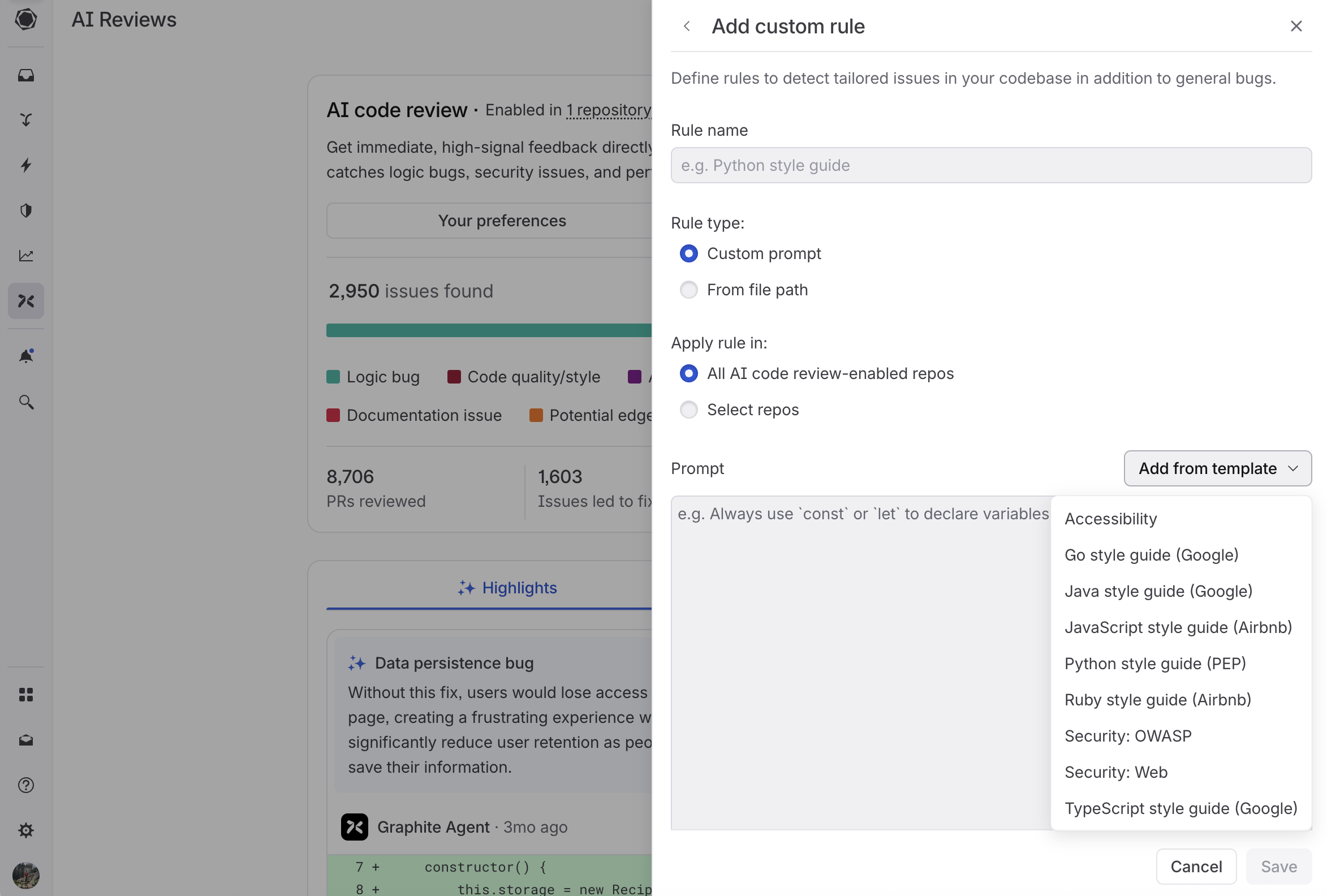 There are two ways to configure custom rules: custom prompts and file-based rules. Below is our recommendation for when each option is most appropriate.
### Custom prompts (Recommended)
Custom prompts are rules written directly in the Graphite UI. They're the recommended approach for most teams.
**Why custom prompts work best:**
* **Focused**: Each rule addresses one specific concern
* **Fast to iterate**: Test and refine rules based on their effectiveness
* **Better performance**: No file processing overhead
* **Easy to manage**: All rules across all repos visible in a single interface
**Getting started:**
1. Use built-in templates for common scenarios:
* Language-specific style guides (JavaScript, Python, Go, etc.)
* Security best practices
* Accessibility standards
2. **Start small**: Create focused rules that address specific concerns
* Example: "JavaScript error handling patterns"
* Example: "API response formatting standards"
3. **Quick start**: Copy relevant sections from your existing coding guidelines and refine them into focused rules
### File-based rules
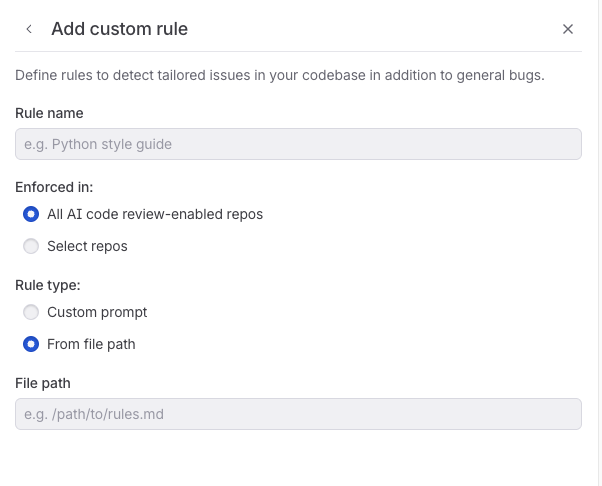
File-based rules reference existing documentation in your repository using glob patterns. Use these sparingly when you have living documentation that changes frequently.
There are two ways to configure custom rules: custom prompts and file-based rules. Below is our recommendation for when each option is most appropriate.
### Custom prompts (Recommended)
Custom prompts are rules written directly in the Graphite UI. They're the recommended approach for most teams.
**Why custom prompts work best:**
* **Focused**: Each rule addresses one specific concern
* **Fast to iterate**: Test and refine rules based on their effectiveness
* **Better performance**: No file processing overhead
* **Easy to manage**: All rules across all repos visible in a single interface
**Getting started:**
1. Use built-in templates for common scenarios:
* Language-specific style guides (JavaScript, Python, Go, etc.)
* Security best practices
* Accessibility standards
2. **Start small**: Create focused rules that address specific concerns
* Example: "JavaScript error handling patterns"
* Example: "API response formatting standards"
3. **Quick start**: Copy relevant sections from your existing coding guidelines and refine them into focused rules
### File-based rules
File-based rules reference existing documentation in your repository using glob patterns. Use these sparingly when you have living documentation that changes frequently.
 **When to use file-based rules:**
* Documentation maintained by other teams that changes regularly
* Shared architectural decision records across repositories
* Style guides that are actively updated
**How they work:**
1. Specify a glob pattern (e.g., `docs/coding-style.md`)
2. Graphite Agent reads the file content from your repository
3. Uses that content as context during code review
**Recommended file paths:**
Store your rules alongside your other code generation markdown files, or use one dedicated folder per repository. Common patterns include:
```
docs/coding-standards.md # Specific documentation file
CONTRIBUTING.md # Contributing guidelines
docs/architecture/*.md # Architecture documentation
.github/rules/*.md # Rules folder in your repo
```
**Limitations:**
* Large files are truncated for performance
* Too many files can reduce review quality
* Glob patterns are case-sensitive
### Best practices for writing custom rules
**Structure your rules clearly:**
* **Format**: Rule → Bad example → Good example → Reasoning
* **Focus**: One specific concern per rule
* **Examples**: Provide 2-3 clear, contrasting examples
* **Test**: Try your rule on recent PRs to verify it adds value
**What works best:**
* Language-specific conventions (naming, imports, error handling)
* Security guidelines (authentication, data validation)
* Framework-specific patterns (React hooks, API design)
**What to avoid:**
* Unnecessary context ("you are a staff-level engineer")
* Overly broad rules ("write good code")
* Praise
* Non-prescriptive verbs ("comment on" or "flag")
* Comments that should actually be exclusions ("don't comment on")
Bad examples:
```
### Bad example 1: Vague database rule
Rule: Don't make breaking changes to database fields. When dropping or adding fields could cause issues, flag them in review.
```
Why is this bad?
* Too vague. What counts as a breaking change to database fields?
* "Flag" is a non-prescriptive verb. Leaving a comment inherently means flagging an issue. What should Graphite Agent tell engineers to do instead? A better alternative would be: "Never drop a required field directly. Always make it nullable first and stop writing to it so that it is no longer used by the entity."
* No examples provided.
```
### Bad example 2: Unclear CSS class naming rule
Always comment on color values like #FF0000 being used in stylesheets. Don't comment on utility classes like bg-red-500 or text-primary.
```
Why is this bad?
* "Comment" is a non-prescriptive verb. Instead, the rule should specify what Graphite Agent's comment should contain.
* This isn't phrased as a rule. The rule should be stated clearly as "Never use hex color values directly, always use design system tokens instead."
* More context is needed. The rule should specify which files or frameworks this applies to (CSS files, styled-components, etc.).
* This prompt mixes custom rules and exclusions. The latter sentence is not necessary.
Good examples:
````
### Good example 1: Security rule with clear structure
## Security Rules
### Rule: Never expose detailed error messages
**Rule:**
Never expose detailed error messages that reveal stack traces or internal system details. In production environments, always return generic error messages to protect the system while logging full details internally for debugging.
**Bad example:**
```js
app.use((err, req, res, next) => {
res.status(500).json({ error: err.stack });
});
```
**Good example:**
```js
app.use((err, req, res, next) => {
res.status(500).json({ error: "Internal Server Error" });
});
```
**Reasoning:**
Revealing stack traces or internal error details can leak sensitive implementation information, making it easier for attackers to exploit vulnerabilities.
````
````
### Good example 2: Database rule with specific context
## Database Rules
### Rule: Use `text` instead of `varchar(n)` for new PostgreSQL columns
**Rule:**
When adding new string columns to TypeORM entities, always use `text` type instead of `varchar(n)` unless there's a specific business requirement for length constraints.
**Good example:**
```ts
@Column({ type: 'text' })
description: string;
```
**Bad example:**
```ts
@Column({ type: 'varchar', length: 255 })
description: string;
```
**Reasoning:**
PostgreSQL handles `text` and `varchar` identically in terms of performance, but `text` avoids arbitrary length limits that can cause issues as data grows.
````
For additional recommendations, see [Anthropic's suggestions for prompt engineering best practices](https://docs.anthropic.com/en/docs/build-with-claude/prompt-engineering/claude-4-best-practices#be-explicit-with-your-instructions).
To set up custom rules:
1. Go to the [AI reviews dashboard](https://app.graphite.com/ai-reviews)
2. Navigate to the **Rules & exclusions** tab
3. Click "Add" next to Custom rules
4. Choose a template or add a custom prompt for your new rule
5. Save your configuration
## Excluding files from AI review
For large repositories, you may want to exclude certain files from AI review analysis. This is useful for:
* Data files that don't need to be reviewed
* Generated code that is automatically created by tools
* Any files that would make a PR too big for Graphite Agent to analyze
You can exclude files by marking them as generated files in your repository's `.gitattributes` file:
```
# Exclude specific files
docs/data.txt linguist-generated=true
# Exclude file types
*.csv linguist-generated=true
*.pb.go linguist-generated=true
# Exclude entire directories
data/** linguist-generated=true
generated/** linguist-generated=true
```
Files marked as `linguist-generated` will be:
* Automatically collapsed in both Graphite and GitHub pull request views
* Excluded from AI review when determining if a PR is too large
* Skipped during the AI review process
For more information, see GitHub's documentation on [customizing how changed files appear on GitHub](https://docs.github.com/en/repositories/working-with-files/managing-files/customizing-how-changed-files-appear-on-github).
## PR-level filtering
Advanced PR-level filtering provides granular control over where AI reviews run. You can configure AI reviews to run on specific pull requests based on defined criteria.
With PR-level filtering, you can control AI reviews based on:
* **PR author**: Run reviews only for specific team members or external contributors
* **File paths**: Analyze PRs only when certain files or directories are modified
* **PR labels**: Trigger reviews based on GitHub labels applied to pull requests
* **PR title and description**: Filter based on text content in PR titles or descriptions
* **Parent branch**: Run analysis based on target branch naming conventions
PR-level filtering provides flexibility to:
* **Control usage and costs**: Optimize AI review usage by focusing on the most important PRs
* **Focus analysis on critical PRs**: Ensure reviews target high-impact changes while skipping routine updates
* **Implement organization-specific review policies**: Align AI review behavior with your team's development workflows and governance requirements
Once saved, AI reviews will only run on new and updated pull requests that match the configured settings in enabled repositories. You can configure these settings through the **Settings** tab on the AI reviews dashboard, and organization admin permissions are required to modify them.
## Measuring rule and exclusion effectiveness
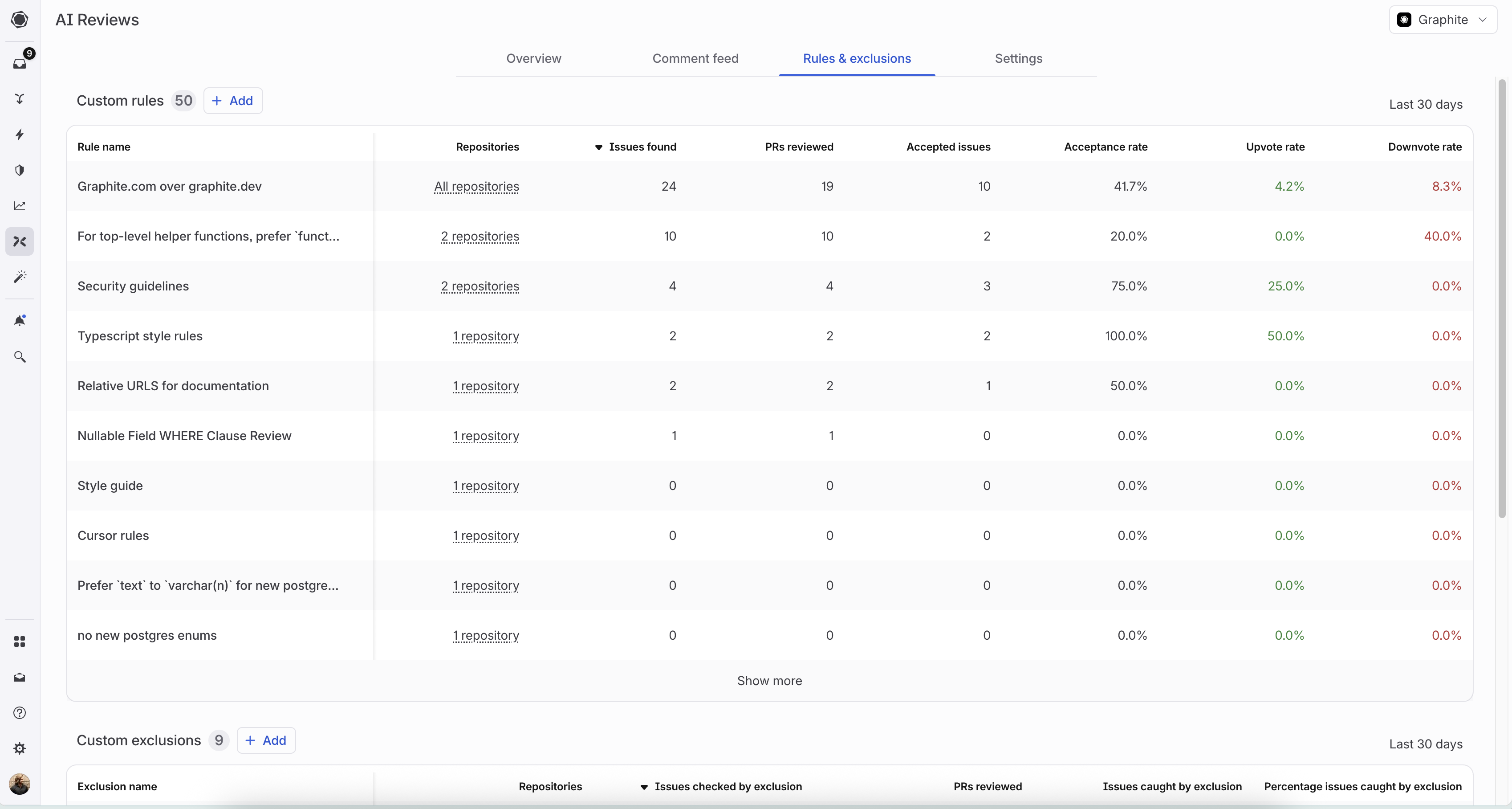
The **Rules & exclusions** tab on the [AI reviews dashboard](https://app.graphite.com/ai-reviews) provides detailed analytics for each custom rule and exclusion you've created.
### Custom rules metrics
For each custom rule, you can track:
* **Issues found**: Total issues flagged by this rule
* **PRs reviewed**: Number of pull requests where this rule was applied
* **Accepted issues**: Issues that led to code changes
* **Acceptance rate**: Percentage of issues that were accepted
* **Upvote/Downvote rates**: Direct feedback from your team
### Comment exclusions metrics
For each exclusion, you can track:
* **Issues checked**: Total issues evaluated against this exclusion
* **PRs reviewed**: Number of pull requests where this exclusion was applied
* **Issues caught**: Issues that were filtered out by this exclusion
* **Percentage caught**: Proportion of checked issues that were excluded
### Using metrics to optimize
Use these metrics to:
* Identify high-performing rules to use as templates for new rules
* Refine or remove rules with low acceptance rates
* Understand which rules resonate with your team
* Fine-tune exclusions that are filtering too many or too few issues
**When to use file-based rules:**
* Documentation maintained by other teams that changes regularly
* Shared architectural decision records across repositories
* Style guides that are actively updated
**How they work:**
1. Specify a glob pattern (e.g., `docs/coding-style.md`)
2. Graphite Agent reads the file content from your repository
3. Uses that content as context during code review
**Recommended file paths:**
Store your rules alongside your other code generation markdown files, or use one dedicated folder per repository. Common patterns include:
```
docs/coding-standards.md # Specific documentation file
CONTRIBUTING.md # Contributing guidelines
docs/architecture/*.md # Architecture documentation
.github/rules/*.md # Rules folder in your repo
```
**Limitations:**
* Large files are truncated for performance
* Too many files can reduce review quality
* Glob patterns are case-sensitive
### Best practices for writing custom rules
**Structure your rules clearly:**
* **Format**: Rule → Bad example → Good example → Reasoning
* **Focus**: One specific concern per rule
* **Examples**: Provide 2-3 clear, contrasting examples
* **Test**: Try your rule on recent PRs to verify it adds value
**What works best:**
* Language-specific conventions (naming, imports, error handling)
* Security guidelines (authentication, data validation)
* Framework-specific patterns (React hooks, API design)
**What to avoid:**
* Unnecessary context ("you are a staff-level engineer")
* Overly broad rules ("write good code")
* Praise
* Non-prescriptive verbs ("comment on" or "flag")
* Comments that should actually be exclusions ("don't comment on")
Bad examples:
```
### Bad example 1: Vague database rule
Rule: Don't make breaking changes to database fields. When dropping or adding fields could cause issues, flag them in review.
```
Why is this bad?
* Too vague. What counts as a breaking change to database fields?
* "Flag" is a non-prescriptive verb. Leaving a comment inherently means flagging an issue. What should Graphite Agent tell engineers to do instead? A better alternative would be: "Never drop a required field directly. Always make it nullable first and stop writing to it so that it is no longer used by the entity."
* No examples provided.
```
### Bad example 2: Unclear CSS class naming rule
Always comment on color values like #FF0000 being used in stylesheets. Don't comment on utility classes like bg-red-500 or text-primary.
```
Why is this bad?
* "Comment" is a non-prescriptive verb. Instead, the rule should specify what Graphite Agent's comment should contain.
* This isn't phrased as a rule. The rule should be stated clearly as "Never use hex color values directly, always use design system tokens instead."
* More context is needed. The rule should specify which files or frameworks this applies to (CSS files, styled-components, etc.).
* This prompt mixes custom rules and exclusions. The latter sentence is not necessary.
Good examples:
````
### Good example 1: Security rule with clear structure
## Security Rules
### Rule: Never expose detailed error messages
**Rule:**
Never expose detailed error messages that reveal stack traces or internal system details. In production environments, always return generic error messages to protect the system while logging full details internally for debugging.
**Bad example:**
```js
app.use((err, req, res, next) => {
res.status(500).json({ error: err.stack });
});
```
**Good example:**
```js
app.use((err, req, res, next) => {
res.status(500).json({ error: "Internal Server Error" });
});
```
**Reasoning:**
Revealing stack traces or internal error details can leak sensitive implementation information, making it easier for attackers to exploit vulnerabilities.
````
````
### Good example 2: Database rule with specific context
## Database Rules
### Rule: Use `text` instead of `varchar(n)` for new PostgreSQL columns
**Rule:**
When adding new string columns to TypeORM entities, always use `text` type instead of `varchar(n)` unless there's a specific business requirement for length constraints.
**Good example:**
```ts
@Column({ type: 'text' })
description: string;
```
**Bad example:**
```ts
@Column({ type: 'varchar', length: 255 })
description: string;
```
**Reasoning:**
PostgreSQL handles `text` and `varchar` identically in terms of performance, but `text` avoids arbitrary length limits that can cause issues as data grows.
````
For additional recommendations, see [Anthropic's suggestions for prompt engineering best practices](https://docs.anthropic.com/en/docs/build-with-claude/prompt-engineering/claude-4-best-practices#be-explicit-with-your-instructions).
To set up custom rules:
1. Go to the [AI reviews dashboard](https://app.graphite.com/ai-reviews)
2. Navigate to the **Rules & exclusions** tab
3. Click "Add" next to Custom rules
4. Choose a template or add a custom prompt for your new rule
5. Save your configuration
## Excluding files from AI review
For large repositories, you may want to exclude certain files from AI review analysis. This is useful for:
* Data files that don't need to be reviewed
* Generated code that is automatically created by tools
* Any files that would make a PR too big for Graphite Agent to analyze
You can exclude files by marking them as generated files in your repository's `.gitattributes` file:
```
# Exclude specific files
docs/data.txt linguist-generated=true
# Exclude file types
*.csv linguist-generated=true
*.pb.go linguist-generated=true
# Exclude entire directories
data/** linguist-generated=true
generated/** linguist-generated=true
```
Files marked as `linguist-generated` will be:
* Automatically collapsed in both Graphite and GitHub pull request views
* Excluded from AI review when determining if a PR is too large
* Skipped during the AI review process
For more information, see GitHub's documentation on [customizing how changed files appear on GitHub](https://docs.github.com/en/repositories/working-with-files/managing-files/customizing-how-changed-files-appear-on-github).
## PR-level filtering
Advanced PR-level filtering provides granular control over where AI reviews run. You can configure AI reviews to run on specific pull requests based on defined criteria.
With PR-level filtering, you can control AI reviews based on:
* **PR author**: Run reviews only for specific team members or external contributors
* **File paths**: Analyze PRs only when certain files or directories are modified
* **PR labels**: Trigger reviews based on GitHub labels applied to pull requests
* **PR title and description**: Filter based on text content in PR titles or descriptions
* **Parent branch**: Run analysis based on target branch naming conventions
PR-level filtering provides flexibility to:
* **Control usage and costs**: Optimize AI review usage by focusing on the most important PRs
* **Focus analysis on critical PRs**: Ensure reviews target high-impact changes while skipping routine updates
* **Implement organization-specific review policies**: Align AI review behavior with your team's development workflows and governance requirements
Once saved, AI reviews will only run on new and updated pull requests that match the configured settings in enabled repositories. You can configure these settings through the **Settings** tab on the AI reviews dashboard, and organization admin permissions are required to modify them.
## Measuring rule and exclusion effectiveness
The **Rules & exclusions** tab on the [AI reviews dashboard](https://app.graphite.com/ai-reviews) provides detailed analytics for each custom rule and exclusion you've created.
### Custom rules metrics
For each custom rule, you can track:
* **Issues found**: Total issues flagged by this rule
* **PRs reviewed**: Number of pull requests where this rule was applied
* **Accepted issues**: Issues that led to code changes
* **Acceptance rate**: Percentage of issues that were accepted
* **Upvote/Downvote rates**: Direct feedback from your team
### Comment exclusions metrics
For each exclusion, you can track:
* **Issues checked**: Total issues evaluated against this exclusion
* **PRs reviewed**: Number of pull requests where this exclusion was applied
* **Issues caught**: Issues that were filtered out by this exclusion
* **Percentage caught**: Proportion of checked issues that were excluded
### Using metrics to optimize
Use these metrics to:
* Identify high-performing rules to use as templates for new rules
* Refine or remove rules with low acceptance rates
* Understand which rules resonate with your team
* Fine-tune exclusions that are filtering too many or too few issues